
Kunai-API
Kunai API It's a high-performance backend solution designed specifically for the Injective ecosystem. Developed in Node.js with TypeScript, this API acts as an intelligent intermediary between Injecti
Video
Công nghệ sử dụng
Sự miêu tả
# 🥷 Kunai API
## Overview
Kunai API It's a high-performance backend solution designed specifically for the Injective ecosystem. Developed in Node.js with TypeScript, this API acts as an intelligent intermediary between Injective's blockchain infrastructure and end users, providing real-time market data, advanced technical analysis, and trading signals.
The core of this project lies in its modular and scalable architecture, designed to separate business logic from HTTP request handling, ensuring ease of maintenance and robust testing. Furthermore, it implements a two-layer authentication system that differentiates between basic and premium users (based on the N1NJ4 NFT), making it an indispensable tool for advanced trading platforms on Injective.
## 🛠️ Main Features
* ⚡ Professional Architecture: Modular structure (Controllers, Routes, Services, Utils) following scalable design patterns.
* 🔒 Advanced Security: Authentication via X-API-KEY for all endpoints.
* 💎 Special Track (N1NJ4): NFT ownership verification requirePremium middleware) to access sensitive data.
* 📊 Real-Time Analytics: Monitoring of Requests Per Second (RPS) and top endpoints in memory.
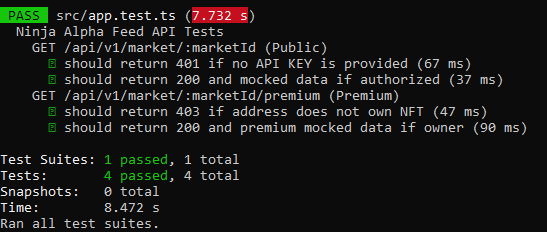
* 🧪 Test Coverage: Robust unit tests using Jest and Supertest.
## 🚀 Installation and Execution
### Prerequisites
* Node.js (v16+)
* npm
### Steps
1. Clone the repository:
```bash
git clone https://github.com/ManyRios/kunai-api
cd kunai-api
```
2. Install dependencies:
```bash
npm install
```
3. Run in development mode:
```bash
npm run dev
# Or using ts-node directly:
npx ts-node src/server.ts
```
## Try the endpoints
```bash
curl -H "X-API-KEY: kunai-secret-key-123" \
http://localhost:3000/api/v1/market/inj-usdt
```
# Premium endpoint
```bash
curl -H "X-API-KEY: kunai-secret-key-123" \
"http://localhost:3000/api/v1/market/inj-usdt/premium?address=inj1abc_owner"
```
## 🧪 Unit Testing
To run the unit test suite and ensure code integrity:
```bash
npm run test