
From telegram tell your OpenClaw to order from any website - it creates a secure credit card on demand from crypto and pays for the order
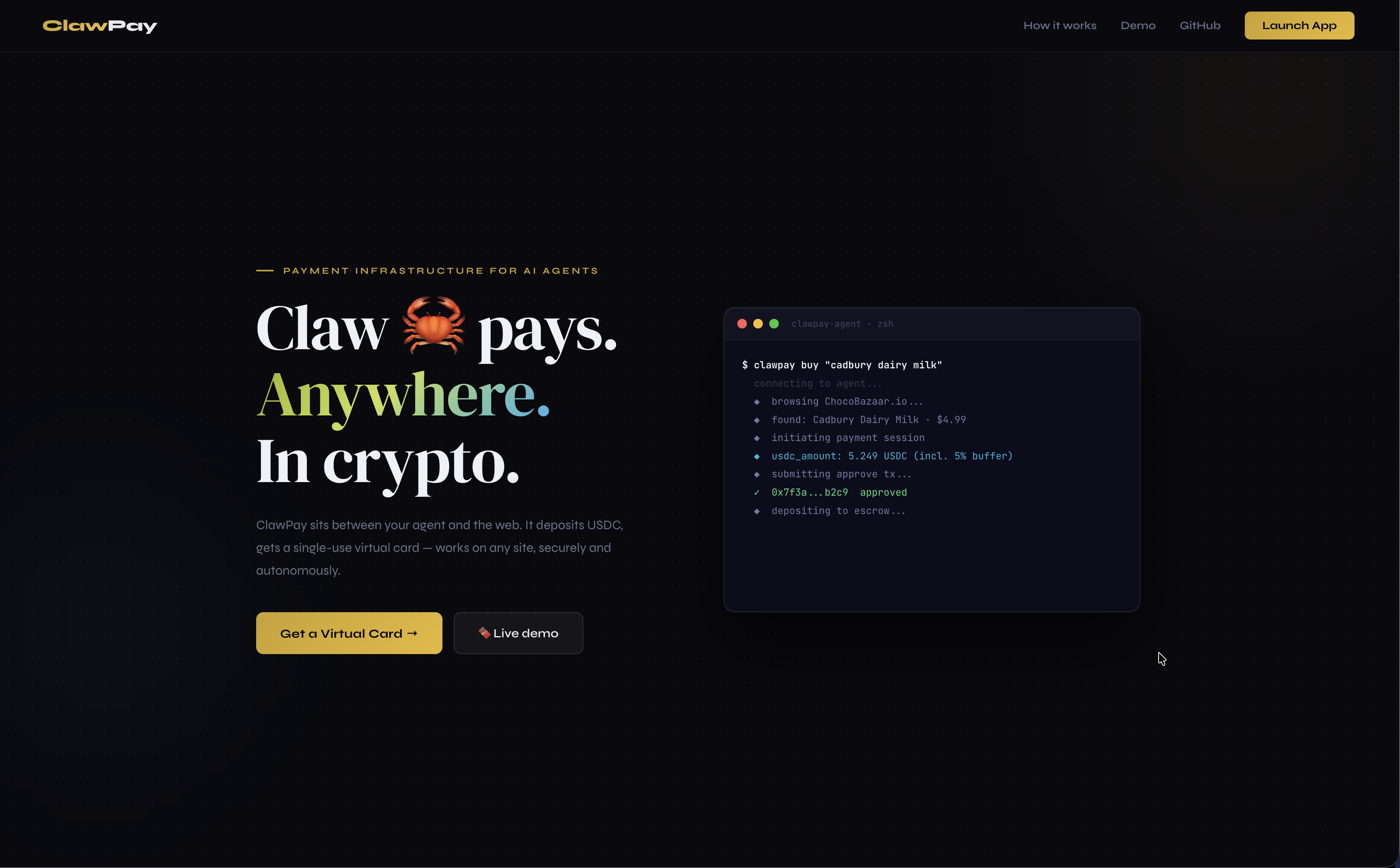
The payment layer for your AI agent. Plug it in — ClawPay pays anywhere on the web, autonomously, without a card on file and without you touching anything.
Your agent can browse, decide, and act - but it can't pay. The only native option is x402, which requires the merchant to explicitly support it. That's a tiny fraction of the internet.
Giving your agent a real debit card is worse: it has persistent access to your funds, and one bad checkout later your card number is compromised.
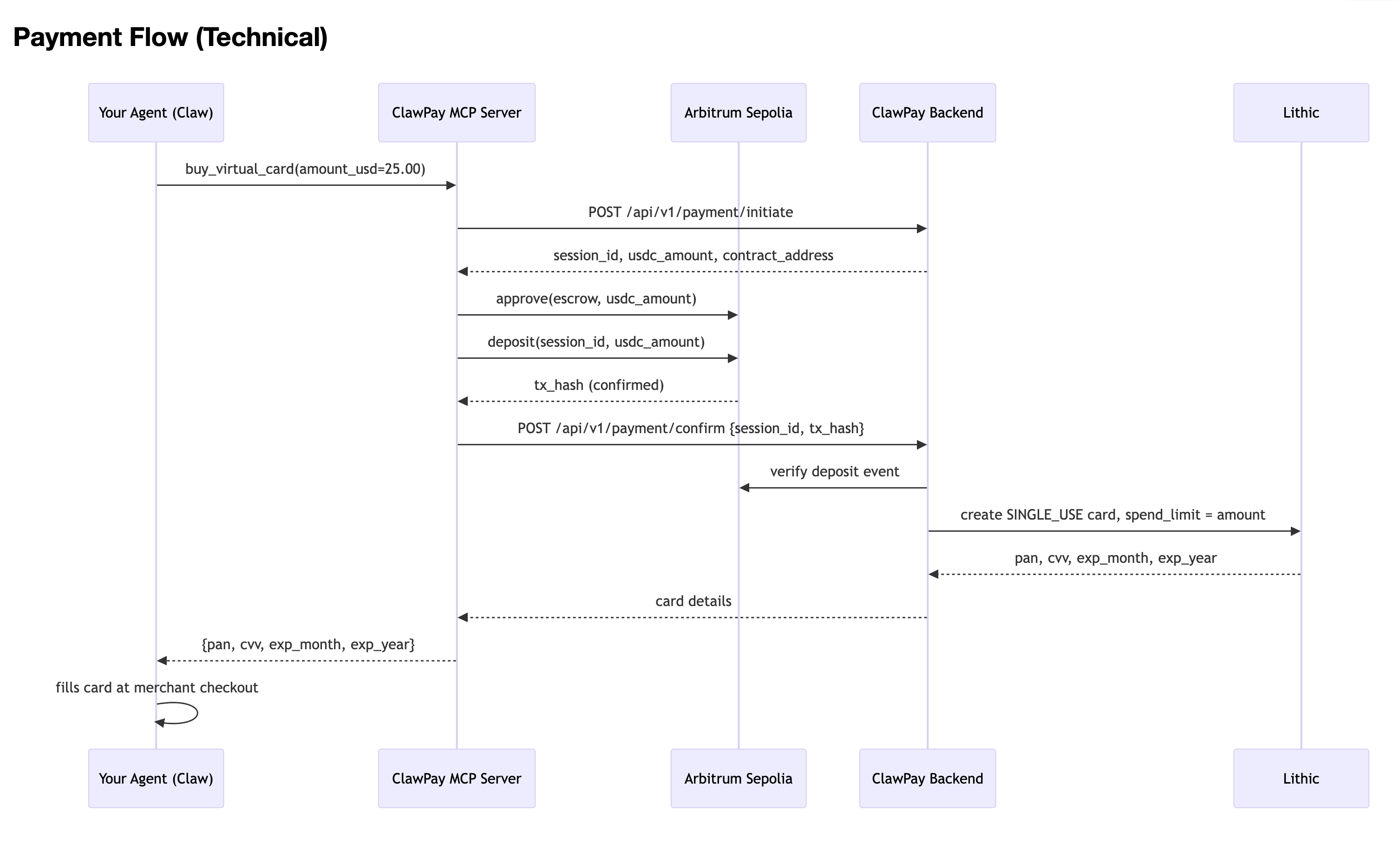
ClawPay sits between your agent and the web's payment infrastructure:
Your agent calls buy_virtual_card() with an amount
USDC is deposited into an on-chain escrow - nothing moves without your wallet signature
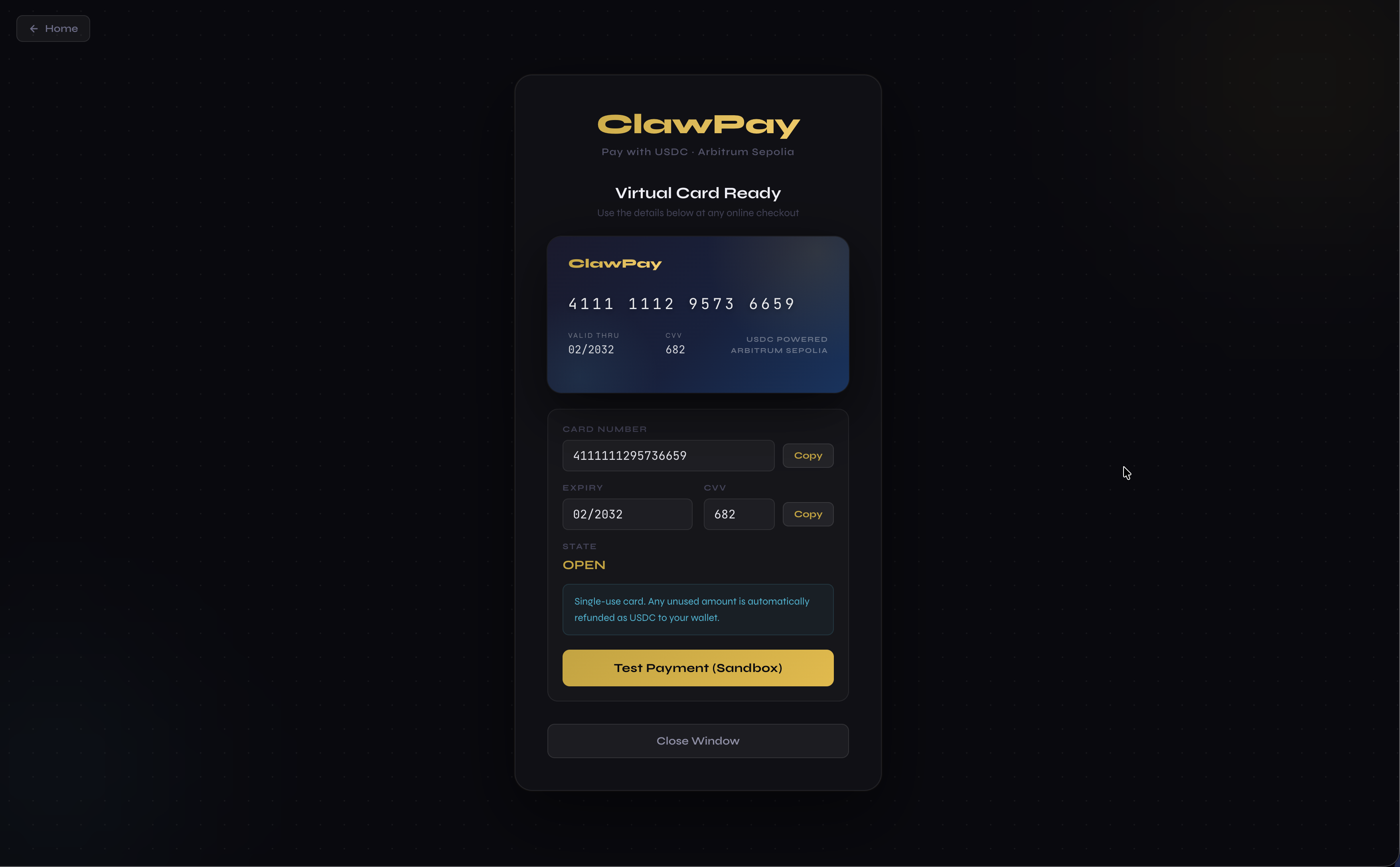
A single-use virtual card is issued with an exact spend limit
Your agent uses that card at any website checkout, just like a human would
Card is dead after one charge. Unused balance refunded as USDC.
No merchant opt-in. No card on file. No human in the loop.
x402 requires the website to support it. ClawPay works on every site that accepts Visa/Mastercard.
On-demand, per-transaction cards - a fresh card with an exact spend limit, every time. Your agent never holds a reusable number.
Spend-capped - even if the card leaks, it can only be charged once for that exact amount, then it's dead.
You hold the crypto - USDC stays in your wallet until you sign. ClawPay never custodies your funds.
No conversion - you don't sell crypto for fiat. Escrow holds USDC, card issuance is triggered on-chain confirmation.
Your Agent (Claw / Claude / any MCP agent)
      │
      │  buy_virtual_card(amount_usd=25.00)
      ▼
ClawPay MCP Server
      │  signs + submits USDC escrow tx
      ▼
Arbitrum Sepolia Escrow Contract
      │  on-chain confirmation
      ▼
ClawPay Backend
      │  verifies tx, issues card
      ▼
Lithic Single-Use Virtual Card
  (exact spend limit, one-time use, dead after charge)
      │
      ▼
Agent checks out on any website - no human needed
┌──────────────────────────────────────┐
│     Your Agent (Claw, Claude, etc.)  │
│   "buy X from website Y for $25"     │
└───────────────┬──────────────────────┘
                │ MCP: buy_virtual_card()
                ▼
┌──────────────────────────────────────┐
│         ClawPay MCP Server           │
│  Signs & submits USDC escrow tx      │
└───────────────┬──────────────────────┘
                │ POST /api/v1/payment/confirm
                ▼
┌──────────────────────────────────────┐
│         ClawPay Backend (FastAPI)    │
│  Verifies on-chain deposit           │
│  Issues Lithic single-use card       │
└───────────────┬──────────────────────┘
                │ {pan, cvv, expiry}
                ▼
┌──────────────────────────────────────┐
│   Agent fills card at any checkout   │
│   Works on any website, no opt-in    │
└──────────────────────────────────────┘
x402 | ClawPay | |
|---|---|---|
Merchant opt-in required | Yes | No |
Card exposure risk | N/A | None - single-use, spend-capped |
Crypto stays as crypto | Yes | Yes - USDC, no conversion |
Agent autonomy | Full | Full |
Coverage | ~handful of sites | Every site that accepts cards |
Layer | Technology |
|---|---|
Blockchain | Arbitrum Sepolia · USDC (ERC-20) |
Smart contract | Solidity escrow ( |
Card issuance | Lithic virtual cards (SINGLE_USE) |
Backend | Python / FastAPI |
Agent interface | MCP (FastMCP) |
Dashboard | React + Vite |
Contract | Address |
|---|---|
MockUSDC |
|
ClawPayEscrow |
|
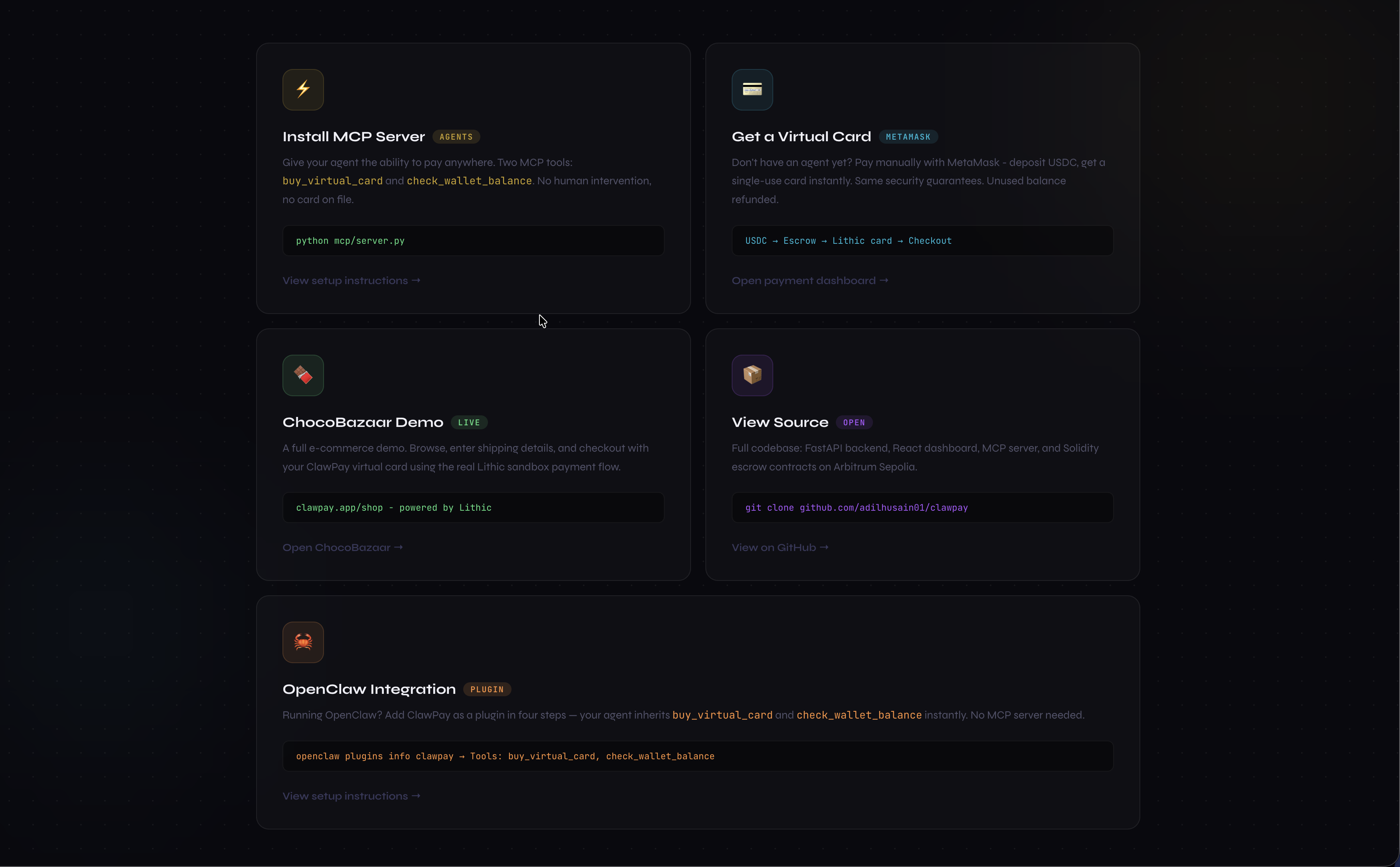
The MCP server gives your agent two tools:
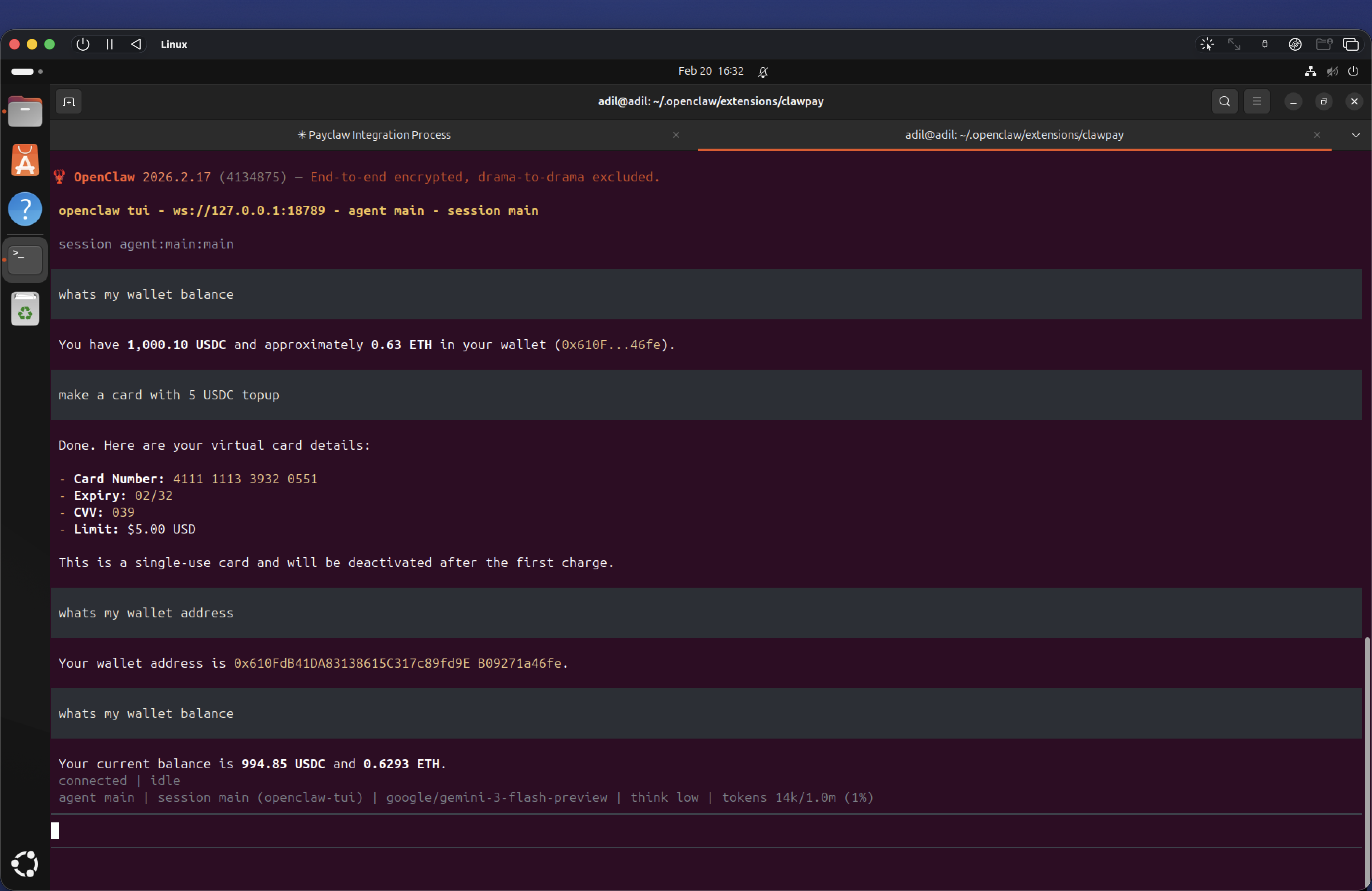
buy_virtual_card(amount_usd, merchant_name?) - deposits USDC, returns a single-use card
check_wallet_balance() - returns the agent wallet's USDC and ETH balances
Add to your Claude Desktop config (~/.claude/claude_desktop_config.json):
{
  "mcpServers": {
    "clawpay": {
      "command": "python",
      "args": ["/path/to/clawpay/mcp/server.py"],
      "env": {
        "AGENT_PRIVATE_KEY": "0x...",
        "CLAWPAY_API_URL": "https://clawpay-production.up.railway.app",
        "CLAWPAY_API_KEY": "sk_clawpay_..."
      }
    }
  }
}
Your agent now handles payments autonomously:
"Buy me a Cadbury Dairy Milk from ChocoBazaar"

# Claw calls ClawPay - no human steps:
#  ◆  deposits USDC into escrow on-chain
#  ◆  receives a single-use virtual card
#  ◆  checks out on the merchant site
#  ✓  card is dead after one charge
Plug ClawPay into OpenClaw so your agent can pay autonomously without any additional setup.
OpenClaw installed and running (openclaw plugins list works)
A wallet funded with ETH (gas) and USDC on Arbitrum Sepolia — get ETH from the faucet, then mint MockUSDC by calling mint(yourWallet, amount) on the MockUSDC contract
A ClawPay API key (sk_clawpay_...)
mkdir -p ~/.openclaw/extensions/clawpay
cd ~/.openclaw/extensions/clawpay
package.json{
"name": "clawpay",
"version": "1.0.0",
"openclaw": {
"extensions": ["./index.ts"]
},
"dependencies": {
"ethers": "^6.0.0"
}
}
openclaw.plugin.json{
"id": "clawpay",
"name": "ClawPay",
"description": "Buy anything online — deposits USDC into escrow on Arbitrum Sepolia, returns a single-use virtual card.",
"version": "1.0.0",
"openclaw": {
"extensions": ["./index.ts"]
},
"configSchema": {
"type": "object",
"additionalProperties": false,
"properties": {
"privateKey": { "type": "string" },
"apiKey": { "type": "string" },
"usdcContract": { "type": "string" }
},
"required": ["privateKey", "apiKey"]
},
"uiHints": {
"privateKey": { "label": "Wallet Private Key", "sensitive": true },
"apiKey": { "label": "ClawPay API Key", "sensitive": true },
"usdcContract": { "label": "USDC Contract Address (optional override)" }
}
}
index.tsimport { ethers } from "ethers";
const ARB_SEPOLIA_RPC = "https://arbitrum-sepolia-testnet.api.pocket.network";
const CLAWPAY_API_URL = "https://clawpay-production.up.railway.app";
const ESCROW_ABI = [
{
inputs: [
{ internalType: "string", name: "sessionId", type: "string" },
{ internalType: "uint256", name: "amount", type: "uint256" },
],
name: "deposit",
outputs: [],
stateMutability: "nonpayable",
type: "function",
},
];
const ERC20_ABI = [
{
inputs: [
{ internalType: "address", name: "spender", type: "address" },
{ internalType: "uint256", name: "amount", type: "uint256" },
],
name: "approve",
outputs: [{ internalType: "bool", name: "", type: "bool" }],
stateMutability: "nonpayable",
type: "function",
},
{
inputs: [{ internalType: "address", name: "account", type: "address" }],
name: "balanceOf",
outputs: [{ internalType: "uint256", name: "", type: "uint256" }],
stateMutability: "view",
type: "function",
},
];
export default function (api: any) {
const cfg = api.config?.plugins?.entries?.clawpay?.config ?? {};
const rawKey: string = cfg.privateKey ?? "";
const apiKey: string = cfg.apiKey ?? "";
const privateKey = rawKey.startsWith("0x") ? rawKey : `0x${rawKey}`;
function wallet() {
const provider = new ethers.JsonRpcProvider(ARB_SEPOLIA_RPC);
return new ethers.Wallet(privateKey, provider);
}
// ── buy_virtual_card ───────────────────────────────────────────────
api.registerTool(
{
name: "buy_virtual_card",
description:
"Use this whenever the user wants to buy something online. " +
"Deposits USDC into escrow on Arbitrum Sepolia, then returns a single-use " +
"virtual Visa/Mastercard to use at checkout. Card is dead after one charge.",
parameters: {
type: "object",
properties: {
amount_usd: {
type: "number",
description: "Exact amount in USD to put on the card (e.g. 25.00)",
},
merchant_name: {
type: "string",
description: "Name of the merchant or website (optional, for labelling)",
},
},
required: ["amount_usd"],
},
async execute(_id: string, params: { amount_usd: number; merchant_name?: string }) {
const w = wallet();
// 1. Initiate session
const initRes = await fetch(`${CLAWPAY_API_URL}/api/v1/payment/initiate`, {
method: "POST",
headers: { "Content-Type": "application/json", "X-API-Key": apiKey },
body: JSON.stringify({
amount_usd: params.amount_usd,
user_wallet_address: w.address,
merchant_name: params.merchant_name,
}),
});
if (!initRes.ok) {
const body = await initRes.text();
return { content: [{ type: "text", text: `ClawPay initiate error: ${body}` }] };
}
const session = await initRes.json();
const { session_id, contract_address, usdc_contract, usdc_amount } = session;
const amount = BigInt(usdc_amount);
// 2. Approve USDC spend
const usdc = new ethers.Contract(usdc_contract, ERC20_ABI, w);
const approveTx = await usdc.approve(contract_address, amount);
await approveTx.wait();
// 3. Deposit into escrow
const escrow = new ethers.Contract(contract_address, ESCROW_ABI, w);
const depositTx = await escrow.deposit(session_id, amount);
const receipt = await depositTx.wait();
// 4. Confirm → get card
const confirmRes = await fetch(`${CLAWPAY_API_URL}/api/v1/payment/confirm`, {
method: "POST",
headers: { "Content-Type": "application/json", "X-API-Key": apiKey },
body: JSON.stringify({
session_id,
tx_hash: receipt.hash,
user_wallet_address: w.address,
}),
});
if (!confirmRes.ok) {
const body = await confirmRes.text();
return { content: [{ type: "text", text: `ClawPay confirm error: ${body}` }] };
}
const result = await confirmRes.json();
const card = result.card ?? result;
return {
content: [{
type: "text",
text: JSON.stringify({
pan: card.pan,
cvv: card.cvv,
exp_month: card.exp_month,
exp_year: card.exp_year,
spend_limit_usd: params.amount_usd,
merchant: params.merchant_name ?? "(any)",
note: "Single-use card — dead after first charge.",
}, null, 2),
}],
};
},
},
{ optional: true }
);
// ── check_wallet_balance ───────────────────────────────────────────
api.registerTool(
{
name: "check_wallet_balance",
description: "Check the agent wallet's USDC and ETH balances on Arbitrum Sepolia.",
parameters: { type: "object", properties: {} },
async execute(_id: string, _params: object) {
const provider = new ethers.JsonRpcProvider(ARB_SEPOLIA_RPC);
const w = wallet();
const usdcAddr = cfg.usdcContract ?? "0xFCABF780284B0d5997914C5b1ab7Ac34F0F01eaE";
const usdc = new ethers.Contract(usdcAddr, ERC20_ABI, provider);
const [usdcBal, ethBal] = await Promise.all([
usdc.balanceOf(w.address),
provider.getBalance(w.address),
]);
return {
content: [{
type: "text",
text: JSON.stringify({
wallet: w.address,
usdc: `${(Number(usdcBal) / 1e6).toFixed(2)} USDC`,
eth: `${ethers.formatEther(ethBal)} ETH`,
}, null, 2),
}],
};
},
},
{ optional: true }
);
}
cd ~/.openclaw/extensions/clawpay
npm install
openclaw.jsonEdit ~/.openclaw/openclaw.json in two places:
a) Allow the tools (inside the existing "tools" block):
"tools": {
  "web": { "...": "..." },
  "allow": ["buy_virtual_card", "check_wallet_balance"]
}
b) Register the plugin (inside the existing "plugins"."entries" block):
"plugins": {
  "entries": {
    "clawpay": {
      "enabled": true,
      "config": {
        "privateKey": "0x<your-wallet-private-key>",
        "apiKey": "sk_clawpay_..."
      }
    }
  }
}
openclaw plugins list            # clawpay should show "loaded"
openclaw plugins info clawpay    # should show Tools: buy_virtual_card, check_wallet_balance
Your agent can now pay on any website the moment you say "buy X for $Y".
cd backend
python3 -m venv venv
source venv/bin/activate
pip install -r requirements.txt
python3 -m uvicorn src.main:app --reload --port 8000
Set in backend/.env:
LITHIC_API_KEY=...
ARB_ESCROW_CONTRACT=0x9ee0141d3FD09E4C15D183bD5017ef86e37b4254
USDC_CONTRACT=0xFCABF780284B0d5997914C5b1ab7Ac34F0F01eaE
ARB_PLATFORM_PRIVATE_KEY=0x...
cd mcp
pip install -r requirements.txt
cp .env.example .env   # fill AGENT_PRIVATE_KEY + CLAWPAY_API_KEY
python server.py
cd dashboard && npm install && npm run dev
Runs at http://localhost:3001 - manual MetaMask flow for testing without an agent.
backend/      FastAPI server - payment sessions, card issuance
contracts/    Solidity escrow (ClawPayEscrow.sol) on Arbitrum Sepolia
dashboard/    React UI - manual payment + card display
extension/    Browser extension - "Pay with ClawPay" button
mcp/          MCP server - agent payment tools
Backend API: https://clawpay-production.up.railway.app
Arbitrum Sepolia - get free ETH from the Arbitrum Sepolia faucet
Lithic sandbox - no real money involved
Cards are SINGLE_USE and closed after first charge
5% buffer on every card spend limit to cover taxes/fees; unused amount refunded as USDC
Made the utility, deployed the contracts to arbitrum sepolia and integrated into the Agent which now can visit and pay on any website with our on-demand card without even having to worry about crypto conversions.
NA